


Managing customer conversations sounds simple until messages start arriving from five different places. Someone asks about shipping through WhatsApp, another customer sends an Instagram DM, and a website visitor needs help before completing a purchase.
For small businesses, keeping everything organized can quickly become a time-consuming challenge.
AnyChat attempts to solve that problem by bringing multiple communication channels into one platform. It combines live chat, AI-powered responses, automation, customer support tools, and a shared inbox.
The interesting part? AnyChat is currently available through an AppSumo lifetime deal starting at $49, making it an appealing option for businesses looking to avoid another recurring software subscription.
But an affordable deal doesn’t automatically mean the software is right for everyone.
With a 4.7/5 rating from 152 AppSumo reviews, AnyChat has earned considerable praise. At the same time, some customers report confusing navigation, integration difficulties, and inconsistent support response times.
This AnyChat review examines what the platform offers, how customers are actually using it, where it struggles, and whether the lifetime deal deserves your money.
AnyChat at a Glance: What You’re Getting
AnyChat is a customer communication and support platform designed to help businesses manage conversations across websites, messaging applications, and social media.
Instead of switching between different inboxes, teams can handle conversations through a centralized workspace while using AI assistants and automation to answer common questions.
| Category | Details |
|---|---|
| Product | AnyChat |
| Official website | anychat.one |
| Software category | AI customer support and omnichannel messaging |
| Primary features | Live chat, AI chatbots, shared inbox, automation, ticketing, knowledge base |
| Supported channels | WhatsApp, Messenger, Instagram, Telegram, email, and more |
| AI integration | OpenAI-compatible providers and bring-your-own API key |
| Best suited for | Small businesses, ecommerce brands, agencies, and support teams |
| AppSumo rating | 4.7/5 from 152 reviews |
| Lifetime deal | Starting at $49 |
| Refund period | 60 days from purchase |
| Main drawback | Learning curve and occasional integration or support issues |
The biggest attraction isn’t any individual feature. It’s the possibility of managing several customer communication tasks without maintaining separate platforms for every channel.
However, the value depends on how many of those capabilities your business will actually use.
Beyond Live Chat: What Can AnyChat Really Do?
AnyChat looks like a conventional website chat solution at first glance. Once you explore its capabilities, though, it becomes clear that the platform is designed for much more.
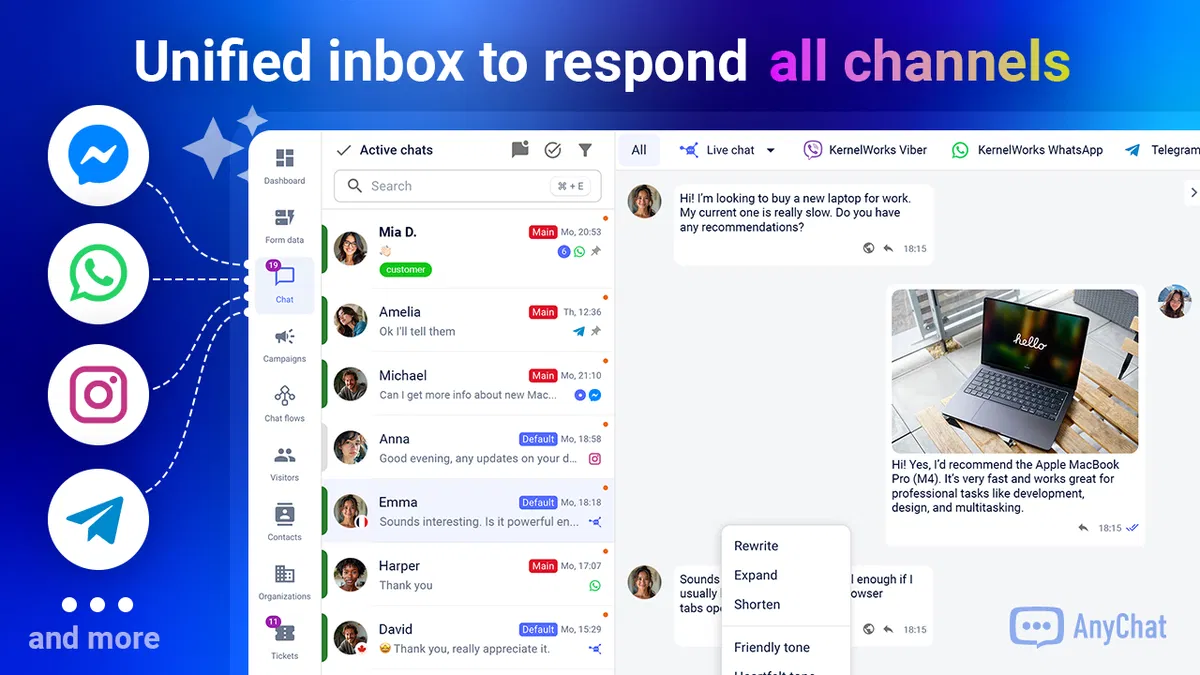
1. One Shared Inbox for Multiple Communication Channels
Consider a small ecommerce store receiving inquiries through Instagram, WhatsApp, Messenger, and its website.
Without a centralized solution, employees may constantly switch applications to respond. Conversations become harder to track, and customers sometimes need to repeat information.
AnyChat addresses this through a unified inbox that brings supported communication channels together.
The platform can help teams manage incoming questions, collaborate on customer conversations, and maintain a more organized support workflow.
This is particularly useful for businesses where social messaging has become just as important as traditional website contact forms.
2. AI Assistants Trained on Your Business Information
AnyChat supports AI assistants that can use business-specific information to respond to customer questions.
You can provide knowledge base articles, documents, and website content to help the assistant understand your products or services.
For example, an online retailer could supply information about delivery policies, returns, product specifications, and frequently asked questions.
The chatbot could then handle routine inquiries while allowing human staff to focus on more complicated requests.
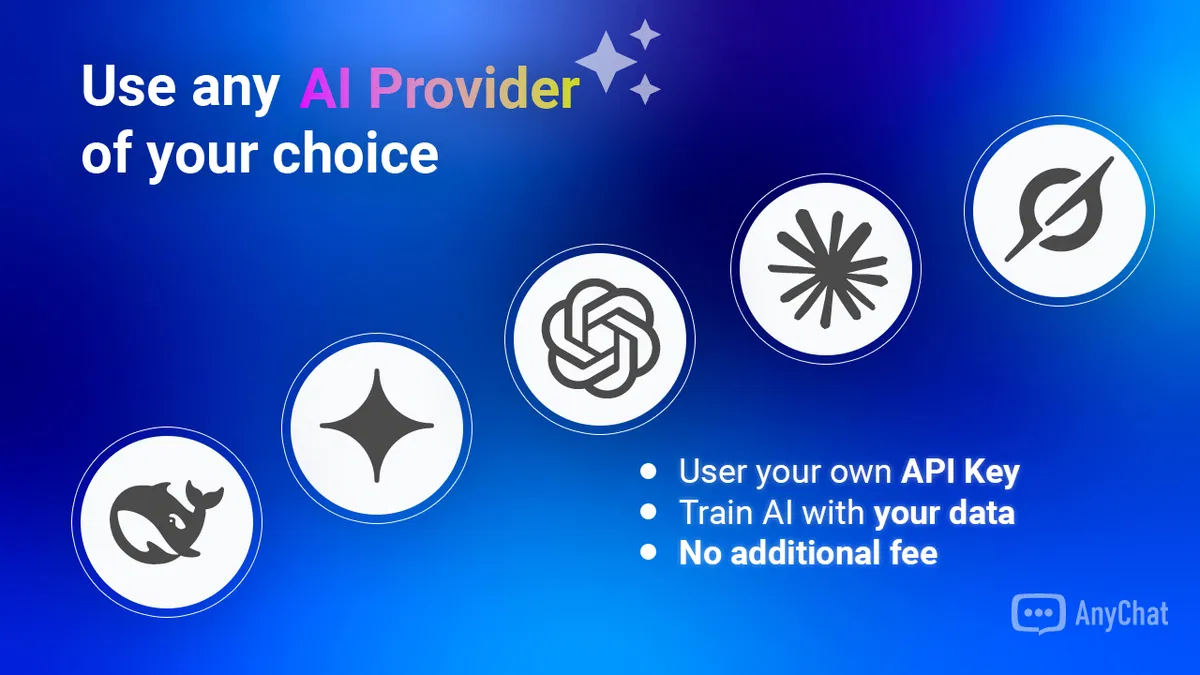
One notable advantage is AI provider flexibility. AnyChat supports OpenAI-compatible services and allows users to connect their own API keys.
That means businesses aren’t necessarily tied to one AI vendor.
However, using your own API key may introduce separate AI usage charges. The lifetime software purchase shouldn’t be confused with unlimited, free access to third-party AI models.
3. No-Code Chatflows and Automation
AnyChat includes a visual chatbot builder for creating automated conversation flows.
Businesses can configure conditional responses, triggers, automated actions, and human handoffs without developing a complete chatbot system from scratch.
Imagine someone visiting a service company’s website and asking for a quotation.
A chatflow could gather the customer’s requirements, collect contact information, and pass the inquiry to a team member for follow-up.
The platform also supports automation involving webhooks, email, and other connected services.
There’s an important distinction here: no-code doesn’t necessarily mean effortless.
Several customer reviews indicate that advanced workflows take time to understand, especially when integrating external applications.
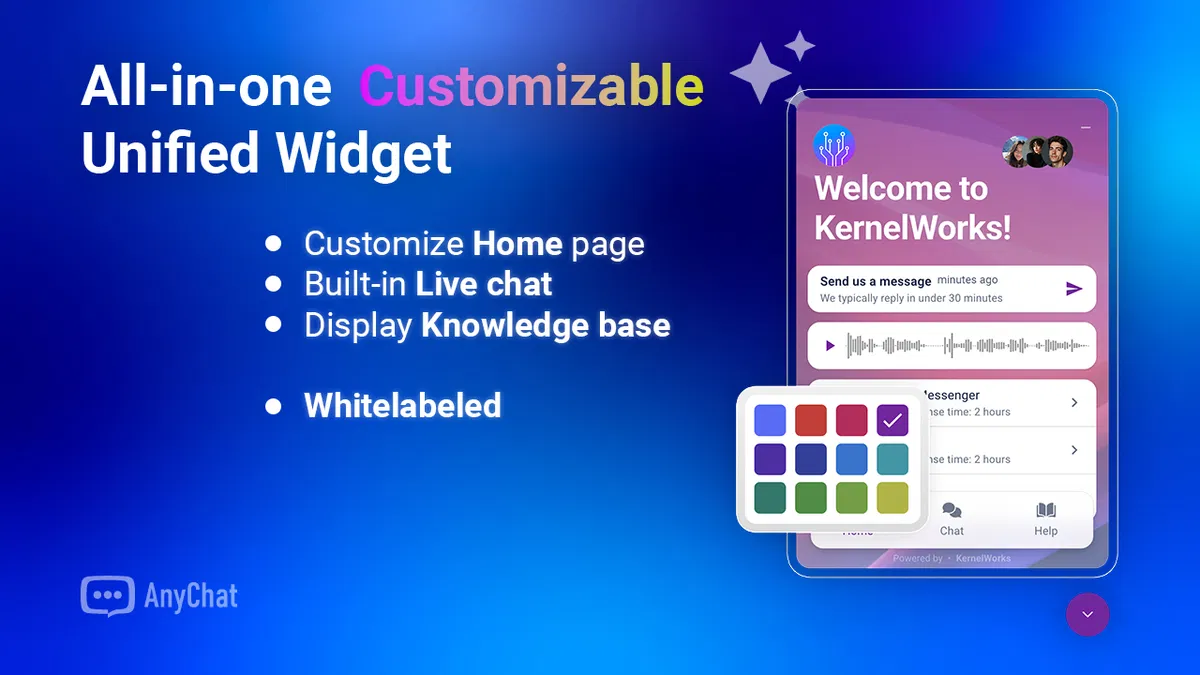
4. Customizable Website Chat Widget
AnyChat’s widget can be customized to match a website’s branding.
Businesses can adjust the appearance and offer multiple contact options without making customers search for separate communication links.
According to the product listing, the widget can combine live chat, knowledge base access, and other contact features.
This makes it useful for WordPress websites, service businesses, and ecommerce stores seeking a consistent customer experience.
5. Ticketing, Knowledge Base, and Customer Management
Beyond messaging, AnyChat includes tools for organizing support requests and publishing helpful information.
A knowledge base can answer repetitive questions before customers contact support. Ticketing features help teams track problems that require additional attention.
These capabilities make AnyChat more relevant to businesses that want a structured support operation, rather than simply a floating chat button.
How AnyChat Fits Into Real Business Workflows
Software features matter most when they solve problems that businesses encounter every day.
AnyChat has several practical applications.
Ecommerce Stores: Answer Questions Before Customers Leave
Online shoppers regularly ask about delivery times, product availability, or return policies.
A business can use AnyChat to make those answers accessible through automated responses or live support.
For stores receiving questions across multiple social platforms, having conversations in one location could reduce unnecessary switching between applications.
Marketing Agencies: Manage Client Conversations
Agencies handling several websites or client brands may benefit from AnyChat’s customization, multiple workspaces, and higher-tier capabilities.
A more advanced setup could support a recurring customer communication service.
However, agencies should carefully examine client account access, branding controls, and support permissions before building a paid service around the platform.
Freelancers and Consultants: Capture More Qualified Inquiries
A freelancer could use a chatbot to collect project requirements, direct prospective customers to relevant services, and organize initial conversations.
For example, a WordPress developer might use automation to distinguish between website maintenance requests, new development projects, and general support questions.
AnyChat could simplify this initial lead qualification, although complex workflows will require configuration.
AnyChat Lifetime Deal: Pricing and Plan Comparison
Pricing is one of AnyChat’s strongest selling points.
As listed on AppSumo in October 2026, the platform offers three lifetime purchase options.
| Feature | Starter | Advanced | Growth |
|---|---|---|---|
| One-time price | $49 | $98 | $147 |
| Domains | Unlimited | Unlimited | Unlimited |
| Conversations | Unlimited | Unlimited | Unlimited |
| AI assistants | 3 | 5 | Unlimited |
| Chatflows | 3 | 5 | Unlimited |
| Widgets | 1 | 3 | Unlimited |
| Workspaces | 1 | 3 | Unlimited |
| Agents included | 3 | 5 | 25 |
| Chat history | 60 days | 90 days | Unlimited |
| Inbox integrations | 1 | 3 | Unlimited |
Source: AnyChat AppSumo listing. Prices and plan inclusions may change.
Which AnyChat Plan Should You Choose?
The Starter plan ($49) makes sense for a single website or small operation that primarily needs live chat and basic automation.
The Advanced plan ($98) provides more flexibility for businesses handling several communication channels or websites.
The Growth plan ($147) is considerably more attractive for agencies, larger teams, and businesses expecting extensive automation requirements.
One detail deserves attention: although all three plans advertise unlimited channels and conversations, the number of inbox integrations, workspaces, assistants, and other resources differs.
For that reason, don’t choose a plan based only on the word “unlimited.”
The AppSumo offer also includes a 60-day refund window and requires code redemption within 60 days of purchase. AppSumo states that its separate “We Got Your Back” guarantee does not apply to this partner-managed listing.
View the Latest AnyChat Lifetime Deal on AppSumo
What Real AnyChat Customers Are Saying
This is where the review becomes particularly interesting.
Customer feedback suggests that AnyChat offers substantial functionality for the price, but user experiences vary considerably depending on technical confidence and the integrations involved.
Customers Appreciate the Features and Value
A recurring theme among positive AppSumo reviews is that AnyChat delivers more functionality than buyers initially expected.
In May 2026, reviewer RajMahal described discovering an extensive collection of communication, automation, CRM-style, and white-label capabilities after initially expecting a simpler chat widget.
Another customer, gransort, praised its value and ongoing product development in August 2026.
Similarly, dalton_araujo reported in June that AnyChat improved daily workflow organization and customer communication.
These experiences suggest that the platform’s biggest advantage may be feature consolidation.
Customers aren’t simply purchasing a messaging widget. They’re gaining access to functionality that might otherwise require several different tools.
Some Businesses Report Meaningful Time Savings
One particularly revealing review came from visar2 in May 2026.
The customer reported that AnyChat’s AI chatbot took over much of the routine work previously handled by a support employee, including replying to leads and managing conversations.
That’s a compelling example of what automated customer communication can achieve.
However, it is an individual customer’s reported experience—not proof that AnyChat will replace an employee or deliver identical results for every business.
Actual savings depend on the quality of the chatbot setup, the complexity of inquiries, and the company’s existing support process.
The Learning Curve Is a Repeated Concern
Despite its advertised no-code functionality, AnyChat isn’t universally described as beginner-friendly.
In August 2026, KaneCut praised the functionality but said the interface could become confusing when configuring important widget settings.
Another detailed September review from Neebyen described the platform as feature-rich, yet difficult to implement fully without sufficient technical knowledge.
That reviewer ultimately requested a refund because the desired agency-level configuration wasn’t working for their needs, despite reporting a positive experience with the founder.
A separate June review from Sousen highlighted challenges around templates, client access, and the setup required to deliver branded chatbot services.
The lesson is straightforward: AnyChat offers considerable flexibility, but that flexibility comes with complexity.
Customer Support Experiences Are Mixed
Customer support is another area where the reviews disagree.
Some purchasers praise founder Andrew Maruschenko for responding personally, resolving problems, and actively improving the product.
Other customers report long waits or missed requests.
In September 2026, MarketingDept-C reported difficulty receiving assistance with an Office 365 email configuration issue. The founder later explained that a spam filter had prevented the support team from seeing the request.
Another September reviewer, Angus05, reported repeated Meta connection problems and difficulty obtaining support.
In June, leandro060 described a WhatsApp integration problem and delayed assistance. The founder subsequently responded with an explanation involving an expired access token.
These reports don’t establish that support is consistently poor, but they reveal a risk worth considering for businesses dependent on uninterrupted customer communication.
Integrations and Bugs Need Careful Testing
Some negative reviews relate specifically to WhatsApp configuration, messaging reliability, and imported contact data.
In May 2026, reviewer suporte325 reported problems sending WhatsApp campaigns. The founder acknowledged a platform-side issue and stated that it had been resolved.
The company’s public changelog also documents ongoing feature releases and fixes.
Notably, version 1.8.56, published September 14, 2026, added Facebook and Instagram Comment-to-DM automation—a capability requested by a customer just one day earlier.
That responsiveness is encouraging, although it doesn’t eliminate the need to test important integrations.
Overall, the published reviews suggest a powerful platform with an active development process, but one that still requires improvements in onboarding, interface clarity, and reliability.
Where AnyChat Still Falls Short
AnyChat’s feature list is impressive, but there are practical limitations buyers shouldn’t overlook.
The first is setup complexity. Basic website chat may be relatively straightforward, while advanced automations and agency configurations demand more patience.
The second is interface usability. Several customers describe needing additional guidance to navigate settings or construct sophisticated chatflows.
Third, integrations may require troubleshooting. WhatsApp and Meta connections, in particular, have appeared in negative reviews.
Finally, lifetime software purchases involve long-term business risk. An affordable one-time license doesn’t guarantee that a young software company will continue operating indefinitely.
Agencies planning to resell customer communication services should consider this carefully.
AnyChat Pros and Cons
| Pros | Cons |
|---|---|
| Competitive lifetime pricing | Advanced setup can be confusing |
| Multiple messaging channels in one inbox | Some customers report slow support |
| Flexible AI provider integration | Occasional integration issues |
| Customizable website chat widget | More beginner tutorials could help |
| Chatflows and support automation | External AI usage may cost extra |
| Agency-oriented capabilities | Long-term lifetime-deal risk |
| Regular feature updates | Not every feature suits small businesses |
The strongest reason to choose AnyChat is its combination of flexibility and affordability.
Its biggest drawback is that getting full value from those features may require substantial setup and learning.
AnyChat vs. Other Customer Messaging Tools
AnyChat isn’t the only platform competing for businesses that need customer messaging and automation.
Two alternatives worth investigating are Intercom and respond.io.
| Platform | Main consideration | Who should investigate it |
|---|---|---|
| AnyChat | Broad messaging and automation features with an AppSumo lifetime offer | Budget-conscious businesses and agencies |
| Intercom | Established customer service platform with AI and support workflows | Teams prioritizing an extensive support ecosystem |
| respond.io | Customer conversation management across messaging channels | Businesses focused on messaging-led sales and operations |
AnyChat’s standout purchasing advantage is the available one-time license rather than a conventional ongoing subscription.
However, pricing alone shouldn’t determine your decision.
For businesses managing critical support operations, ease of implementation, service reliability, vendor support, and integration requirements may matter more than the initial purchase price.
Who Should Buy AnyChat—and Who Should Skip It?
AnyChat is worth considering if you run a small business receiving customer messages from multiple channels and want to simplify your workflow.
It’s also potentially attractive for technically confident freelancers, ecommerce teams, and agencies willing to invest time in building automation systems.
The platform makes particular sense when you can identify several features you’ll actually use, rather than buying it solely because the lifetime price looks appealing.
On the other hand, beginners wanting a chatbot that requires virtually no configuration may find simpler alternatives more comfortable.
Businesses needing guaranteed response times, highly specific integrations, or complex client-management controls should validate those requirements before committing.
Final Verdict: Is AnyChat Worth Buying in 2026?
AnyChat occupies an interesting position in the customer communication market.
It combines omnichannel messaging, AI assistants, live chat, and workflow automation in a product available at an unusually accessible one-time price.
Customer feedback provides meaningful reasons to consider it. Buyers frequently praise the range of features, customization options, value for money, and continued development.
But the negative reviews also deserve attention.
The interface isn’t universally intuitive, certain integrations have caused problems, and customer support responsiveness has been inconsistent.
For a technically comfortable business owner or agency willing to learn the platform, AnyChat could offer excellent long-term value.
For someone expecting sophisticated AI automation to work perfectly without configuration, it may be less suitable.
Our recommendation: AnyChat is worth shortlisting if you want to consolidate customer conversations and reduce dependence on multiple communication subscriptions. Start by identifying your required channels and workflows, then choose the smallest plan that comfortably supports them.
If you purchase the lifetime deal, use the refund period to test your most important integrations under realistic conditions.
Ultimately, AnyChat looks most promising for businesses that value functionality and customization—and are prepared to spend some time getting everything right.
Check the Latest AnyChat Lifetime Deal on AppSumo →
Research note: This review is based on published product information, AppSumo customer reviews, FiveTaco listings, the independent Dave Swift review, and AnyChat’s official documentation and changelog. It does not claim independent hands-on testing by Tools Worthy. Pricing and features were checked against the publicly available listing in October 2026.
Frequently Asked Questions
Is AnyChat a lifetime deal?
Yes. At the time of this review, AnyChat offers lifetime access through AppSumo, with plans starting at $49. Check the current listing for updated availability and terms.
Does AnyChat work with WordPress?
Yes. AnyChat’s AppSumo documentation confirms WordPress compatibility, including a plugin and options for embedding its communication widget.
Can AnyChat answer customer questions automatically?
Yes. Its AI assistants can use knowledge base content, website information, and uploaded documents to help generate relevant responses.
Does AnyChat support WhatsApp and Instagram?
Yes. Both platforms are supported, alongside Messenger, Telegram, and other communication channels. Particular integrations may require additional setup.
Is AnyChat suitable for beginners?
Basic functionality may be approachable, but customer feedback indicates a noticeable learning curve for advanced automation and agency configurations.
Are AI messages included free with the lifetime purchase?
Not necessarily. AnyChat allows users to connect third-party AI providers using their own API keys. Provider usage charges may still apply separately.
Can I get a refund?
The current AppSumo listing states that purchases are refundable within 60 days, subject to the applicable deal terms.